Automate. Analyze. Grow.All in One Powerful Platform.
Smart automation, real-time analytics, and powerful proxy infrastructure to grow your Instagram presence and streamline operations.
1,058
accounts active
Managed Accounts
Across all workspaces
1.28M
total followers
Tracked Followers
Latest snapshot
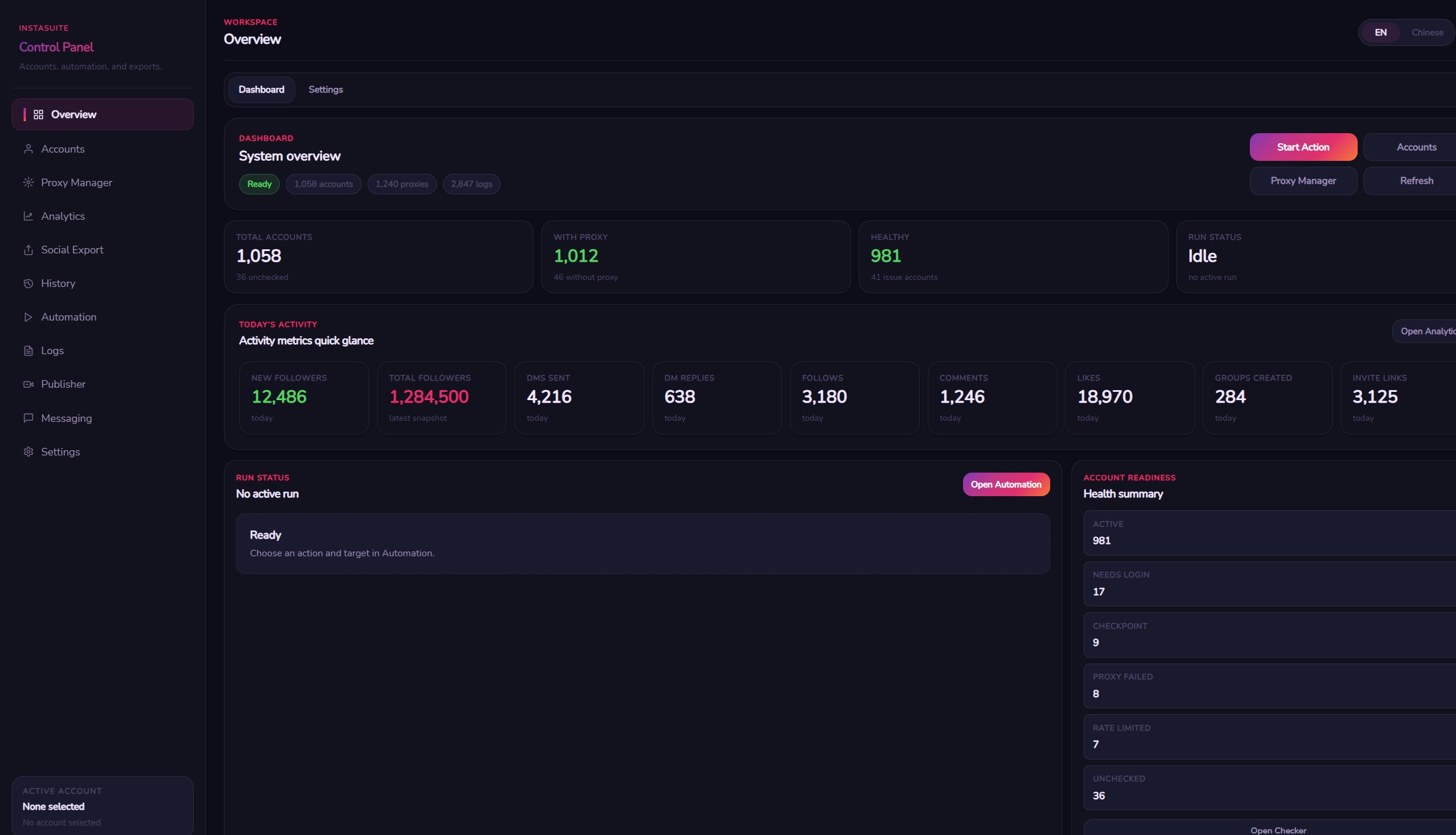
4,216
messages sent
DMs Sent Today
Across sender accounts
1,012
accounts with proxy
Proxy-Enabled
Secure · Isolated per account
1,058
accounts active
Managed Accounts
Across all workspaces
1.28M
total followers
Tracked Followers
Latest snapshot
4,216
messages sent
DMs Sent Today
Across sender accounts
1,012
accounts with proxy
Proxy-Enabled
Secure · Isolated per account
Everything You Need, at Scale
Real numbers from active InstaSuite workspaces — manage hundreds of accounts with full automation, proxy isolation, and live analytics.
0
Managed Accounts
Instagram accounts in one dashboard
0
Proxy-Enabled
Accounts with dedicated proxies
0.00M
Tracked Followers
Across all managed accounts
0
DMs Sent Today
Bulk campaigns running in parallel
Built for serious operators
Every tool in InstaSuite is purpose-built for managing Instagram at scale — from DMs to proxies to bulk automation.
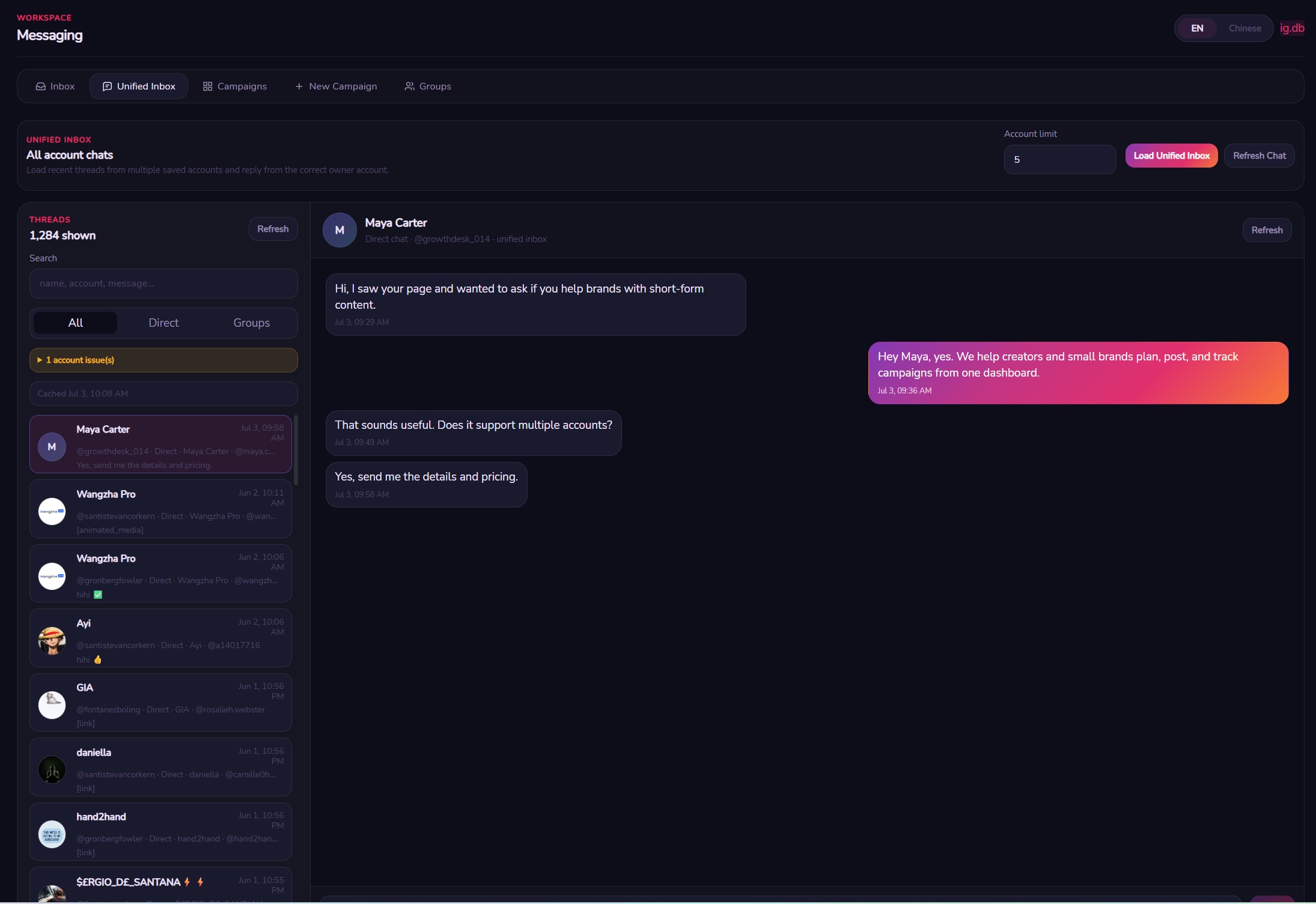
Unified Inbox
Read, reply, and manage DMs across all your Instagram accounts from a single workspace — no more switching tabs or losing context.
- 💬Multi-account thread view in one panel
- ⚡Realtime MQTT inbox listener
- ↩️Send, react, reply, and unsend
- 👥Group chat management
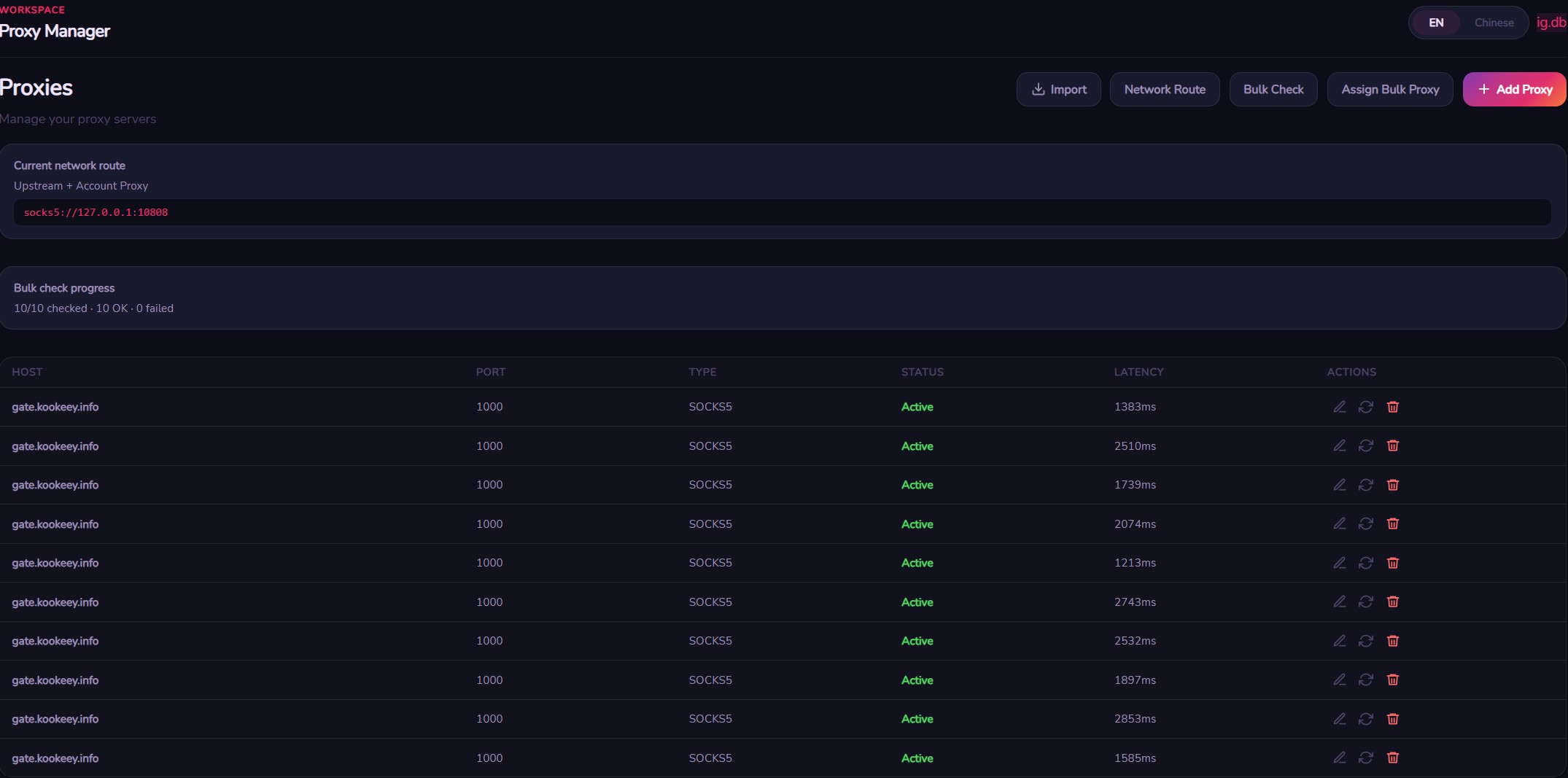
Proxy Manager
Assign dedicated proxies per account, bulk-import lists, and test live connectivity — full network isolation without touching a config file.
- 🔒Per-account proxy assignment
- 📋Bulk import via TXT or CSV
- 🟢Live proxy health check
- 🌐SOCKS5, HTTP & HTTPS support
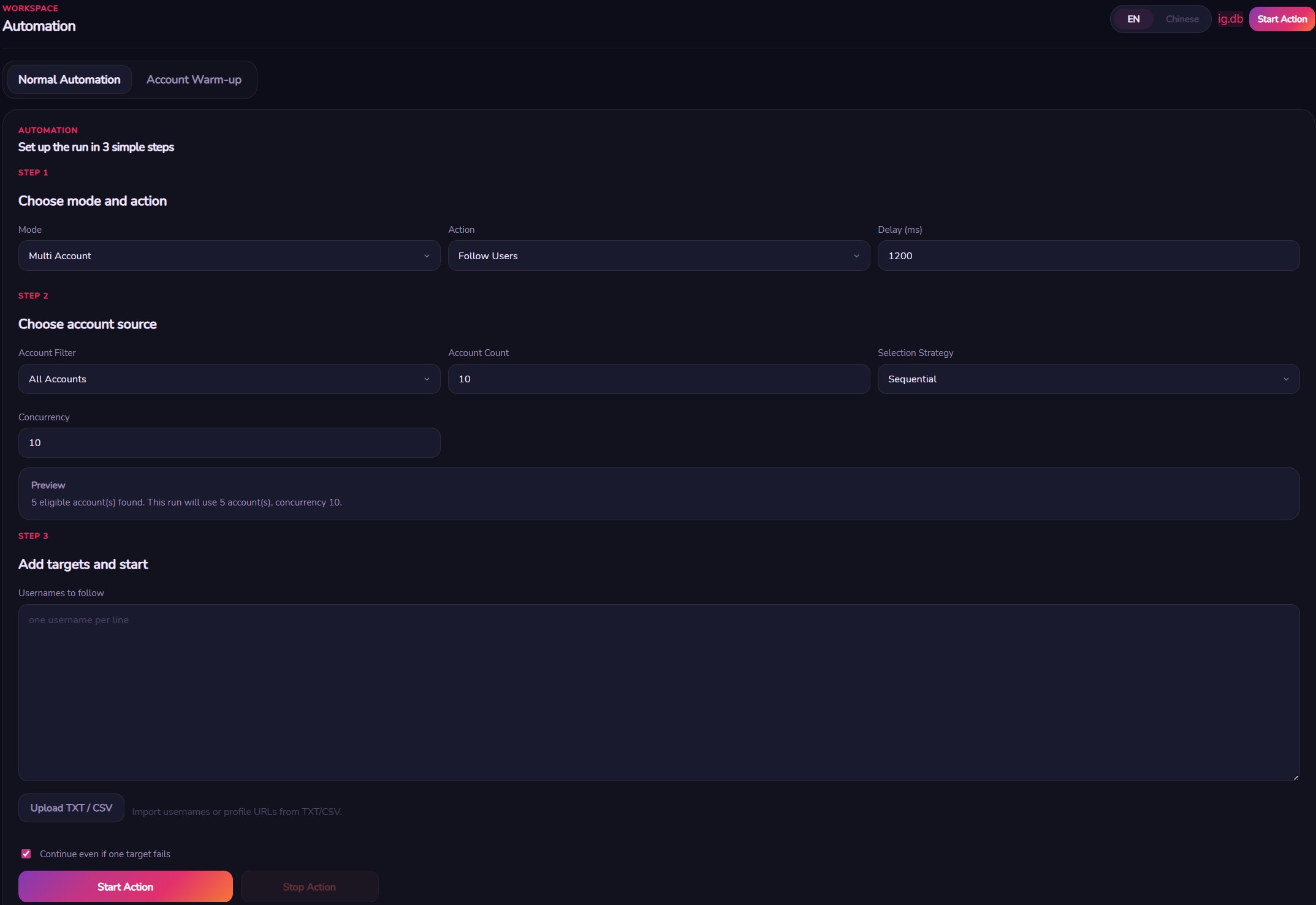
Follow, Like & Comment Automation
Run targeted follow, unfollow, like, and comment actions across single or bulk accounts — sequential or parallel, with warmup mode built in.
- 🤖Follow / unfollow / like / comment
- ⚙️Parallel execution with concurrency control
- 🔥Built-in account warmup mode
- 🎯Single account or group-based targeting
Social Export
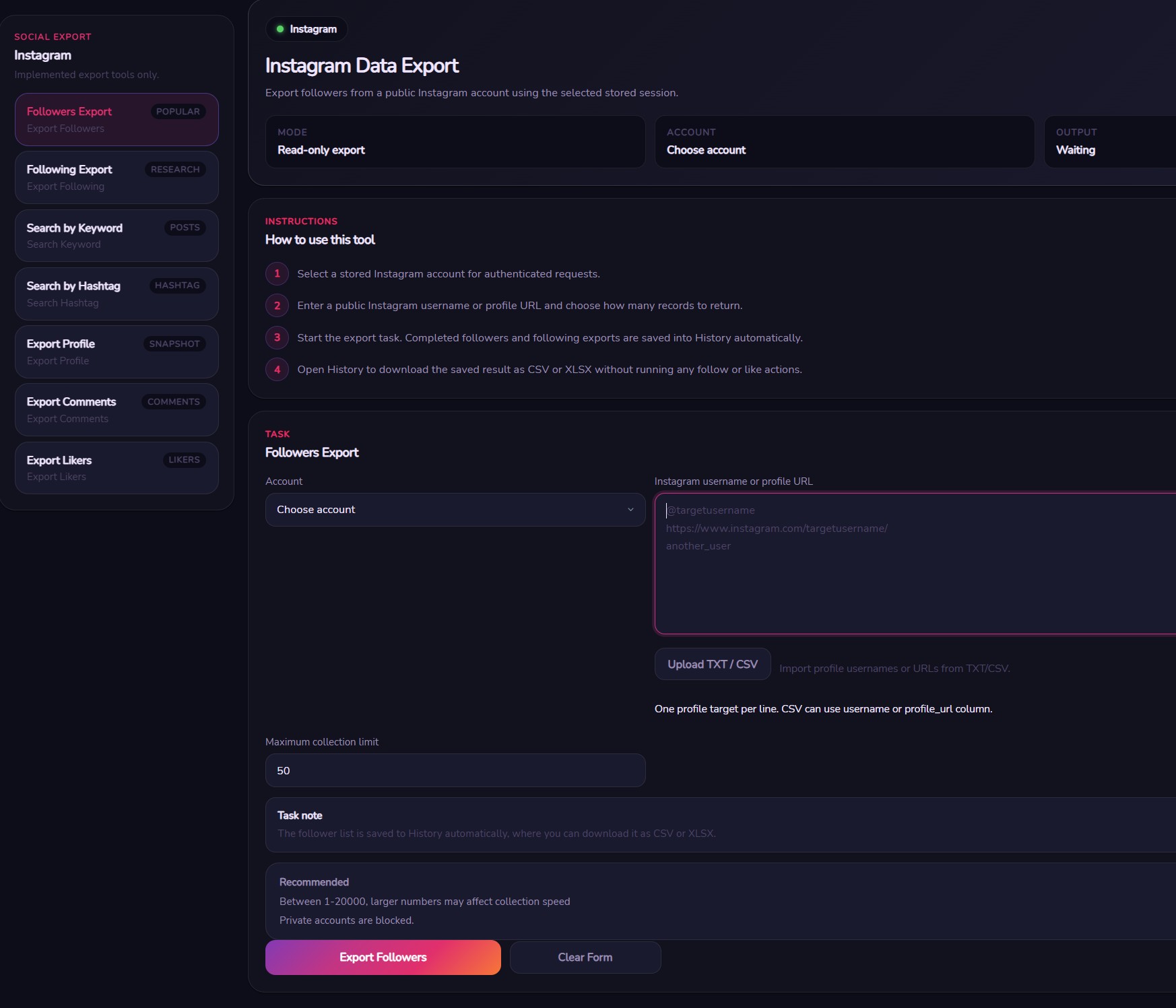
Export followers, following, post likers, comments, and full profiles. Search posts by keyword or hashtag — results auto-save to History and export to CSV or XLSX.
- 📤Followers & following export
- ❤️Post likers & comment scrapers
- 🔍Keyword & hashtag post search
- 📊CSV / XLSX download
Normal & Warm Automation
Watch how InstaSuite handles parallel follow automation and warmup scheduling across multiple accounts simultaneously.
Safety Mode Controls
Global safety settings that protect your accounts from bans, rate limits, and detection — configured once, enforced everywhere.
Daily DM Caps
Set a hard ceiling on how many DMs each account sends per day to stay within safe limits.
Cooldown Periods
Automatic cooldowns between actions prevent Instagram rate-limiting and account flags.
Proxy Requirement
Accounts without a proxy can be blocked from running automation until one is assigned.
Health-Check Blocking
Accounts that fail health checks are automatically excluded from all automation runs.
Link Blocking
Strip URLs from outbound messages to reduce the chance of triggering Instagram spam filters.
Per-Account Isolation
Each account runs in its own session context with separate cookies, device fingerprint, and proxy.
Everything InstaSuite can do
Every capability across all modules — available on every plan.
Account Management
10 features
Multi-account dashboard
Manage up to 1000 Instagram accounts from one unified interface
Password login
Login with username + password directly inside the app
Session import (cookies)
Import existing sessions via cookie strings or JSON bundles
Bulk session import
Import hundreds of accounts at once from TXT, CSV, or JSON
Bulk password login
Paste a list of credentials and log in all accounts in one click
2FA & email challenge
Full two-factor auth and email challenge support during login
Session export
Export any account session for backup or migration
Account groups
Organize accounts into named groups and run actions per group
Account health check
Run connectivity and session health checks across all accounts
Delete account
Remove accounts and their data cleanly from the app
All features included on every plan — Starter through Enterprise.
All features. Pay for accounts.
Every plan includes the full feature set. The only difference is how many Instagram accounts you can manage.
- 5 Instagram accounts
- All automation features
- DM campaigns
- Social export (CSV/XLSX)
- Proxy manager
- Analytics & history
- Unified inbox
- Documentation access
- 20 Instagram accounts
- All automation features
- DM campaigns
- Social export (CSV/XLSX)
- Proxy manager
- Analytics & history
- Unified inbox
- Email support
- 100 Instagram accounts
- All automation features
- DM campaigns
- Social export (CSV/XLSX)
- Proxy manager
- Analytics & history
- Unified inbox
- Priority email support
- Onboarding call
- 1000 Instagram accounts
- All automation features
- DM campaigns
- Social export (CSV/XLSX)
- Proxy manager
- Analytics & history
- Unified inbox
- Dedicated onboarding
- Setup assistance
- Direct support channel
- 1000+ Instagram accounts
- Everything in Enterprise
- Custom account limit
- White-label options
- Reseller arrangements
- Negotiated pricing
- Dedicated account manager
License keys are delivered by email after purchase. One license per machine. Windows desktop app.
Common questions
Everything you need to know before getting started.
What is InstaSuite?
InstaSuite is a Windows desktop app for managing multiple Instagram accounts at scale. It runs fully on your PC — no browser, no cloud. It covers automation (follow, unfollow, like, comment), bulk DM campaigns, a unified inbox, proxy management, social data export, profile publishing, and analytics, all from one dashboard.
How do I add accounts — do I need my password?
You have two options: log in with username and password directly inside the app (with full 2FA and email challenge support), or import an existing session via cookie string or JSON bundle. You can also bulk-import hundreds of accounts at once from a TXT, CSV, or JSON file — including bulk password login.
Can I run automation on multiple accounts at the same time?
Yes. InstaSuite supports both sequential and parallel execution. In parallel mode you set a concurrency limit — for example 5 accounts running simultaneously — and the app distributes the workload across them. You can also target an entire account group in one run instead of picking accounts manually.
How does the DM campaign work exactly?
You create a campaign with a target username list, pick your sender accounts, write a message template using variables like {username}, optionally add multiple message variants that rotate randomly, set an emoji pool, configure per-sender daily limits, and set send delays. The campaign runs in parallel across all senders and shows live progress with per-sender stats.
What does the Unified Inbox do?
The Unified Inbox pulls DMs from all your accounts into one view using a realtime MQTT listener — so new messages appear instantly without refreshing. You can read, reply, react, and unsend messages, manage group chats, add or remove group members, and generate group invite links, all without switching accounts.
How does proxy management work?
You assign one proxy per account — SOCKS5, HTTP, or HTTPS. Proxies can be imported in bulk from TXT or CSV, assigned round-robin from a pool, or mapped account-by-account. You can test any proxy live from inside the app. You can also enforce a rule that blocks automation on any account without a proxy assigned.
What can I export with Social Export?
You can export followers, following, post likers, post comments, and full profile snapshots for any target account. You can search posts by keyword, hashtag, or location. All results are saved to export history and downloadable as CSV or XLSX files directly to your Downloads folder.
Can I publish posts or edit profiles from InstaSuite?
Yes. The Publishing module lets you upload and post videos to Instagram, update profile photos (including bulk avatar updates from a folder), edit bios and display names, and run bulk profile updates across many accounts at once using template variable blocks.
What analytics does InstaSuite track?
InstaSuite logs every action — follows, unfollows, likes, comments, DMs sent — per account, with timestamps. You can view follower history snapshots, campaign analytics with success/fail rates, and filter by date range. Analytics export to CSV, XLSX, or a formatted proof-of-work report you can share with clients.
What safety controls are built in?
InstaSuite has global safety settings: daily DM caps per account, cooldown periods between actions, automatic exclusion of accounts that fail health checks, link blocking in outbound messages, and per-account session isolation (separate cookies, device fingerprint, and proxy per account). All settings are saved and enforced automatically on every run.
Is my data stored on your servers?
No. InstaSuite runs entirely on your machine. Your Instagram credentials, session cookies, proxy details, campaign data, and analytics are stored in a local SQLite database on your PC. Nothing is transmitted to our servers. Proxy credentials and session IDs are also masked in the app logs.
Does it work on Mac or Linux?
InstaSuite is currently a Windows-only desktop application. Mac and Linux versions are not available at this time.
How does the account limit work across plans?
Each plan sets a maximum number of Instagram accounts you can add to the app — 5 on Starter, 20 on Pro, 100 on Agency, 1000 on Enterprise. All plans include every feature. The limit is enforced by your license key. If you need more slots, upgrade your plan and activate the new key.
What happens after I purchase?
You receive a license key by email. Open InstaSuite, paste the key on first launch, and your plan activates immediately. The key is tied to your machine. If you need to move to a new PC, contact support.
What support is included with each plan?
Starter includes full documentation access. Pro adds email support. Agency includes priority email support plus an onboarding call. Enterprise includes dedicated onboarding, setup assistance, and a direct support channel. Custom plans get a dedicated account manager.